
Forum tip: Always check when replies were posted. Technology evolves quickly, so some answers may not be up-to-date anymore.
-
 Andre
0Hi there,
Andre
0Hi there,
I just got started with MSP360 RMM and noticed that all machines report the same disk space used: 87.12%.
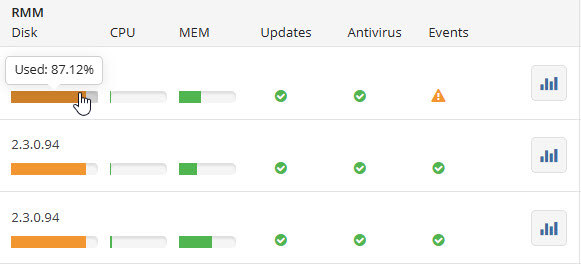
It doesn't matter if the disks are half full, barely used or full to the brim, it's always 87.12%.
Has anybody else encountered the same and maybe found a solution? -
 Sergey
6Andre, last time I've seen this happen - there was like a same disk on all computers that reported the same %, because it was the same. Can you check if it is the case for you too? Clicking the Disk % bar should take you to the list of disks on the specific PC, so you can compare on a couple of computers.
Sergey
6Andre, last time I've seen this happen - there was like a same disk on all computers that reported the same %, because it was the same. Can you check if it is the case for you too? Clicking the Disk % bar should take you to the list of disks on the specific PC, so you can compare on a couple of computers.
Let me know how it goes for you! -
Andre
0Thanks for getting back to me.
As I said, it doesn't matter how full the respective disks are (and if I ever manage a stack where they all really hit 87.21% at the same time, I'll try my luck at Powerball for sure).
They're from entirely different manufacturers, and their usage is wildly different. Mind you, it does show real numbers when I open the RMM fly-out, just not on the summary page. Funnily enough, CPU and MEM usage are presented differently there, as they should be.


Welcome to MSP360 Forum!
Thank you for visiting! Please take a moment to register so that you can participate in discussions!
Categories
- MSP360 Managed Products
- Managed Backup - General
- Managed Backup Windows
- Managed Backup Mac
- Managed Backup Linux
- Managed Backup SQL Server
- Managed Backup Exchange
- Managed Backup Microsoft 365
- Managed Backup G Workspace
- RMM
- Connect (Managed)
- Deep Instinct
- CloudBerry Backup
- Backup Windows
- Backup Mac
- Backup for Linux
- Backup SQL Server
- Backup Exchange
- Connect Free/Pro (Remote Desktop)
- CloudBerry Explorer
- CloudBerry Drive
More Discussions
- Terms of Service
- Useful Hints and Tips
- Sign In
- © 2025 MSP360 Forum