Hi,
TL;DR:
Cloudberry Drive Drive no longer works, on multiple machines. It is blocked by Windows, due to having a ~10 year old signature of incompatible type. In the end we setup RClone (free) mounting instead of CBD!
Background:
We are an MSP with a few clients that use MSP360 Cloudberry Drive (‘CBD’), to mount Wasabi storage (AWS S3 compatible) as a local drive letter. For desktop installs, that’s it. For server installs, it is then shared and a couple of end users map the share to their laptops. It’s just for archive data, not regular use.
MSP360 licensing failures:
Recently Cloudberry drive randomly died on a Windows 2022 Datacentre HyperV VM. The license was released, and was unable to be activated on the same or a different server. Offline activation also failed. In the end we had to contact MSP360 and wait for them to release the license properly.
CBD Driver woes:
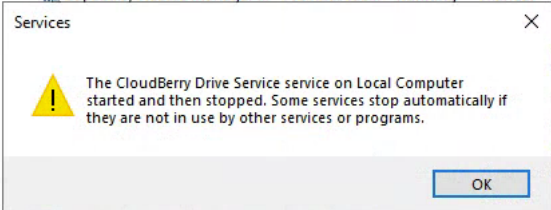
Once the license was activated again on a different server, we had the same issue where CBD refused to work. CBD loads, you click 'start service, it then tries to start but stops immediately. Down the rabbit hole we went, ran a bunch of Powershell commands to see where things were going wrong, and discovered the problem is an underlying driver (cbfs6.sys) with a very old signature that is both expired and doesn’t meet current requirements, resulting in Windows blocking it. This must be something enforced after the June Windows updates. MSP360 has been informed. Some more digging revealed that Mountain Duck uses the same underlying technology, but with a newer version of the same driver!
[Apologies; this pathetic forum only allows one image and 2 URLs for new users, so a few images and links had to be removed!]
Resolution:
We doubt MSP360 is going to fix this anytime soon, and indeed, they are hiding behind the fact that we are not paying for ongoing support products we already we paid for, sending us here to the community forum, for which one has to apply to enter. So much time wasted! As such, we implemented RClone (free; RClone mount doco; requires WinFSP; with a scheduled task that mounts the drive at boot), and moved on with our lives.
We don’t expect this post will get a reply with a fix for CBD. It’s more of an FYI for anyone who might be stuck with the bloody driver failing. As you can imagine, we are not impressed with the vendor. They need to update the driver… needed to years ago.
Cheers,
Dave
---------------------------------------
More details:
(result of a long chat with AI, and running many PS command to unveil the problem)
CloudBerry Drive Service fails to start on Windows Server 2022
— cbfs6.sys driver blocked by Windows (Win32 error 577 / CodeIntegrity Event 3004)
Summary:
CloudBerry Drive Service fails to start on two separate Windows Server 2022 Domain Controller VMs. This occurred first on Server A after roughly a year of stable operation, and reproduced identically after license release/reactivation on a second, independent Server B. Both servers are running the current release of CloudBerry Drive (“Check for updates” confirms latest version on both) — this is not a legacy-build issue.
Service architecture clarification:
“CloudBerry Drive Service” itself starts successfully and logs “Service started successfully” in the Application log every time. However, this parent service immediately spawns a child process, CloudBerryDriveHost.exe, which performs the actual drive-mounting work. It is this child host process that fails and exits within ~1 second every time (exit code 1), which in turn causes the parent service to stop. The service-level logs are misleadingly clean because the failure occurs one layer down, in the host process, not in the service itself — this is confirmed in the CloudBerry Drive log file (...\CloudBerry Drive\Logs\), which shows:
DriveHost started. PID: xxxx
ERROR - The host process xxxx has unexpectedly exited with error code: 1.
The service received stop command.
Root cause identified:
The bundled kernel driver cbfs6.sys (file dated 9/21/2016) fails to load with:
sc.exe start cbfs6
[SC] StartService FAILED 577:
Windows cannot verify the digital signature for this file...
Corresponding Code Integrity log entry:
Event ID 3004, Microsoft-Windows-CodeIntegrity/Operational:
"Windows is unable to verify the image integrity of the file
\Device\HarddiskVolume4\Windows\System32\drivers\cbfs6.sys because file hash
could not be found on the system."
Get-AuthenticodeSignature on the file confirms it is signed via an EldoS Corporation cross-signed certificate that expired 3/26/2017 (issuer: VeriSign Class 3 Code Signing 2010 CA) — not a WHCP-issued signature.
Trigger:
The affected servers installed the June 9, 2026 Windows Server 2022 cumulative update (KB5094128, build 20348.5256). Per Microsoft’s own documentation, the Vulnerable/Recommended Driver Blocklist applies to Windows Server 2022 and is serviced through standard monthly cumulative updates (source: Microsoft recommended driver block rules | Microsoft Learn). This update appears to have enforced a block against cbfs6.sys as currently signed.
Critical finding for MSP360:
The currently shipped installer (confirmed latest version on both servers as of this week) still bundles the same 2016-dated, cross-signed cbfs6.sys. Updating to the latest CloudBerry Drive release did not replace this driver or resolve the issue. This means every current Server 2022 customer patched to KB5094128 or later is exposed to this failure.
Requested action:
- Confirm whether a WHCP-signed / currently-trusted build of the CBFS driver exists or is in progress.
- Provide an ETA for a driver update, or an official workaround that doesn’t require disabling HVCI/driver blocklist enforcement on a server.
Environment:
- OS: Windows Server 2022 Datacenter
- CloudBerry Drive: Server Edition, latest release (per in-app “Check for updates”)
- Update installed at time of failure: KB5094128 (June 9, 2026)
---------------------------------------
 ):
):