
Forum tip: Always check when replies were posted. Technology evolves quickly, so some answers may not be up-to-date anymore.
-
Linux VersionHi , I understand it's not exactly what you're looking for - but you might want to try running the Windows version through Wine (starting from Wine 3.12, simulate Win7 x86). Seems to be running fine for me
-
Deploy consistency checkHello , there's currently no way to do this, but we consider such a possibility for the future updates. I've added you to the list. Sorry for the inconvenience
-
Restore backup from WindowsYes, there should be no trouble with that - just add the storage account (make sure to select the right bucket/container) and specify the Prefix, that should be it
-
Restore backup from Windows, yes, the blog post is relevant. The controls might look a bit different, but the logic is 100% the same
-
Are there plans to release CloudBerry Explorer for Amazon S3 on the Mac platform?Hi , yes, we absolutely do plan to make it.
Perhaps can share some details, but basically think of 4-7 months. -
What's new - Backup for Mac v 2.6.1.41Hi , we are finishing some last minute polishing on the stand-alone version - you can postpone the update till we release it or get a release candidate right here
-
2.0.0.9 + unattendet Access =/= workingHi , is this still relevant? You might need to restart the CloudBerry Remote Assistant Service manually. There was a couple of times when this was the case, and apparently service restart has helped.
-
Help us choose the next big feature, thanks noted.
The first one will be a feature of the paid version of Remote Assistant. Since we're at it, would you like to have a web portal where all the computers are shown online/offline - or will it suffice for you to have it indicated in the RA client itself?
The other two I've filed as enhancement requests. -
Direct connection coming soon!, nope. Remote Assistant will attempt to traverse the NAT - and if it succeeds, the connection will do through Direct Internet. If it fails, the connection will go over our server
-
Password for unattended access?Apologies for the delayed response.
Indeed, CloudBerry Remote Assistant will attempt to connect into a live session of a Windows user if you know the password.
If you don't know it or don't want to input it there - use the <other user> option to get to the Windows authentication screen. Note that by doing this you might interrupt the person who's actively working by the machine at the moment (does not affect RDP sessions) -
Consistency Check Backblaze B2Hello . The button is called differently but you can make the application do the same operation if you go Settings > Application > Synchronize Repository. After that Backup will "learn" what's really there in the storage and upload whatever is missing at next backup run.
If the discrepancy persists or occurs again, please contact supportatcloudberrylabdotcom
Also, let me remind you to restore your backups for testing before you actually need to restore them to recover from a data loss. A little paranoia is a good thing in this case -
Release notes for version 2.6.1.4?Hi , sorry I was travelling last week. It's not the full release notes, but check out this thread for news
-
Unattended access failed - user credentials invalidSorry for the delay. No ideas right away. Please do the following on both computers: Menu > Diagnostics > Send to support. Please refer to this thread and specify whether each machine is the remote host or the client.
Thanks in advance -
Launching RA from KeePassHello , we are going to publish an update in a week or so that can do something similar. We've chosen to make a CLI to RA. I believe KeePass can handle this?
The syntax will be as followsThe syntax will be as follows
> "CloudBerry Remote Assistant.exe" activateLicense -e useratmaildotbox -f
This will activate a freeware license for the email address given.
> "CloudBerry Remote Assistant.exe" configGeneralAccess
This will generate a link for attended (or "general") access
> "CloudBerry Remote Assistant.exe" configUnattendedAccess
This will enable encryption and unattended access and generate a long link, you will probably need to save it on your side somewhere; the link includes all the parameters at once.
Executing the command multiple times does not re-generate the encryption key.
> "CloudBerry Remote Assistant.exe" "$link"
This will establish connection with the given link (it can work with attended access as well); make sure to keep the link "in the quotes" to escape the slash characters it contains.
Generally, to connect from machine B to machine A you would run "CloudBerry Remote Assistant.exe" configUnattendedAccess on the machine A, then "CloudBerry Remote Assistant.exe" "$link" on the machine B. -
Web Interface not workingHello , well that's not the expected behavior.
You might want to try this to make sure the web page is available:
curl localhost:43210
Otherwise, check if there were any updates to your firewall rules - just in case.
If neither helps, I'd recommend to open a support ticket - use the [Feedback > Send] in GUI or [./cbb sendLog] in CLI. -
slow connection to remote machine - lag, I'll send you a link shortly in the support ticket you have with us.
-
Unattended access failed - user credentials invalidHi . It's usually more efficient to contact supportatcloudberrylabdotcom but since it's a somewhat common issue, I'll gladly answer here.
I assume you are trying to connect to a Windows 10 (or Server 2016) machine
One of the latest updates to Windows 10 breaks authentication to a remote host in case some fields about the user are not filled.
There's an article about it (https://lonelycoding.com/system-directoryservices-accountmanagement-principalcontext-broken-after-windows-10-update/), and this is a quote from it:
__
The problem is caused by missing registry entries in HKEY_LOCAL_MACHINE\SOFTWARE\WOW6432Node\Microsoft\Windows NT\CurrentVersion, specifically: RegisteredOwner and RegisteredOrganization the Registry Editor by pressing Windows R and typing regedit.exe . Browse to the location above
Just right click on the CurrentVersion in the Registry Editor and select New > String Value. After you add each entry ( RegisteredOwner and RegisteredOrganization ) edit their values. You can use your username and company name respectively.
__
Please follow the instructions from the article, it should resolve the issue once and for all. It will suffice if you enter "sdfsdf" or anything similar to both fields.
Let me know whether the issue persists after that or not. -
slow connection to remote machine - lagHello . As stated in the ticket, that's most likely caused by the current architecture of Remote Assistant - the connections are not direct, all data goes (encrypted) over our servers.
We currently run internal tests for the direct connection, so it's very likely we'll publish it soon. How soon - this will depend on how the tests go -
Access Denied Error on CMB CentOS 7Hi . There's a button that will lead you from the sidepanel straight to Backup History - see the screenshot below.
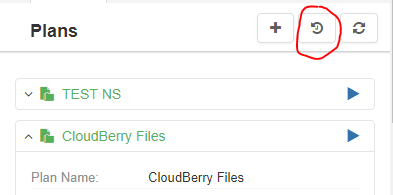
You might need to adjust the filters to make sure the right info is displayed
Most likely the backup plan is running on behalf of a user who is not allowed to read the backup data.
A plan will run with the permissions of the user who owns the plan configuration file - they are located at /opt/local/"product name"/etc/plans. You might want to change the ownership and try again.
If that does not help, please send the diagnostics as shown on the screenshot below
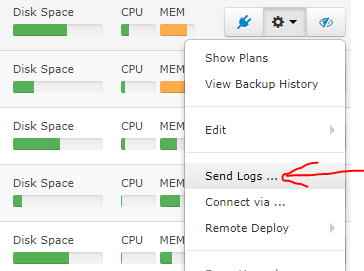
This will automatically open a support ticket -
CloudBerry Backup installed in a container, since you have created another thread about it, let's discuss it there - https://forum.cloudberrylab.com/discussion/531/browsing-mount-points-with-autofs-in-ubuntu-18-04
