
Forum tip: Always check when replies were posted. Technology evolves quickly, so some answers may not be up-to-date anymore.
Comments
-
Backup stuck at "starting, please wait"Hello , please send the diagnostic logs from the Feedback menu in the top menu bar (or use [./cbb sendLog] in CLI) to involve our Support Team. It will automatically create a support ticket for you.
This is the most efficient way to get assistance on a technical issue. -
Cloudberry Backup on ARM, thanks, this is the right "category" to discuss such things.
Let me quote my previous response for everyone else to see:
Thanks for the explanation of the use case, registered your request.
Let me tell you for sure, our roadmap for the next half a year is pretty much complete - so an ARM version won't be available that soon even if we decide to make it.
Just trying to be transparent here. -
Several general questions forum protocolHello . Thanks for the explanation of the use case, registered your request.
Let me tell you for sure, our roadmap for the next half a year is pretty much complete - so an ARM version won't be available that soon even if we decide to make it.
Just trying to be transparent here. -
Feature requestsOK, the request is clear now, thanks. We will consider it for the future releases
-
Some new user questions, well not the Amazon Glacier but you can leverage Amazon S3 "Glacier" storage class, and that one of course supports Amazon server side encryption.
-
Some new user questionsWalter,
Yes, there is a way if you use the GUI.
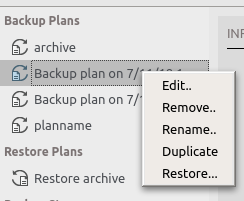
For WebUI and CLI the is not added yet - but it will be eventually, maybe even in the next release -
Cannot control remote computer, that makes sense. I'll take it to further discussions with the R&D, thank you.
-
Some new user questionsHello Walter.
In CloudBerry Backup only one destination per plan is allowed so you will need 3 plans in this case. Then you can set compression and encryption only for the cloud plan, while leaving local backups not compressed and not encrypted.
Server side encryption is supported for Amazon S3, also Microsoft Azure enforces it (so it's always active).
Let me also inform you (because it's hard to find it now) that we have a number of Help articles that might be useful. -
Cannot control remote computer, please check out the attached screenshot - here's how it looks like now. The top menu bar is what you see when connecting TO another machine.
If you have any idea how to make it more obvious - please let me know.Attachment untitled
(148K)
untitled
(148K)

-
Problem with filenames containing non-english characters, i.e ÅÄÖA little update: apparently our instruction was incomplete.
Thanks to , we found it out and fixed. Here's the full set of commands to perform in such a case:
sudo sed -i 's/#en_US.UTF-8 UTF-8/en_US.UTF-8 UTF-8/' "/etc/locale.gen"
sudo locale-gen en_US
sudo locale-gen en_US.UTF-8
sudo update-locale -
Feature requestsHi , nice nickname!
Please specify what you mean by "Clipboard history".
Also, PIN. If you mean the RA own "PIN" - it can only be used when connecting to a live Windows user session, therefore there is no need for Windows Login. Perhaps I misunderstand you? -
Problem with filenames containing non-english characters, i.e ÅÄÖ, now that is unexpected. Would you mind sending the latest logs to the ticket that has been created earlier? Thanks in advance
-
Problem with filenames containing non-english characters, i.e ÅÄÖHello . Indeed, that's a known issue. Most likely the following commands will fix it for you, please give it a try:
sudo locale-gen en_US
sudo locale-gen en_US.UTF-8
sudo update-locale -
My PC crashed during a remote session - drop shadows and cursor shaw missingHi . Do you use the latest version, 1.7.2.116?
If no, please update and try again.
If yes, we will need the app logs (you can send them from Menu > Diagnostic) and event logs (System and Application, please send them attached to supportatcloudberrylabdotcom) from both PCs.
Please refer to this forum thread while sending all the information.
Thanks in advance -
Release notes - Remote Assistant 1.7.2There's a known issue when the connection doesn't go through the UP and LOCKED Windows user session, with this very error message. If somebody presses Ctrl+Alt+Del, the connection will be established just fine, but obviously that's a weak workaround.
The connection goes fine while no session is up, and while the user session is up and NOT locked.
The bug is supposed to be fixed in the next release, sorry for the inconvenience. -
Established, waiting for incoming data..., somehow we missed this thread, my apologies. In the latest version the issue can only be reproduced under specific circumstances - see below.
, there's a known issue when the connection doesn't go through the UP and LOCKED Windows user session, with this very error message. If somebody presses Ctrl+Alt+Del, the connection will be established just fine, but obviously that's a weak workaround.
The connection goes fine while no session is up, and while the user session is up and NOT locked.
The bug is supposed to be fixed in the next release, sorry for the inconvenience. -
CLI support, thanks for the details and the screenshots. The idea is pretty clear now.
I've filed your request, we will discuss it internally.
I will get back to you on here, on the forum, as soon as we have an idea of how and when it may be implemented.

